
1) Open Internet Options.
a. From the Internet Explorer browser, click on Tools --> Internet Options.
b. Or, click on the Start button --> open the Control Panel options --> click on Internet Options
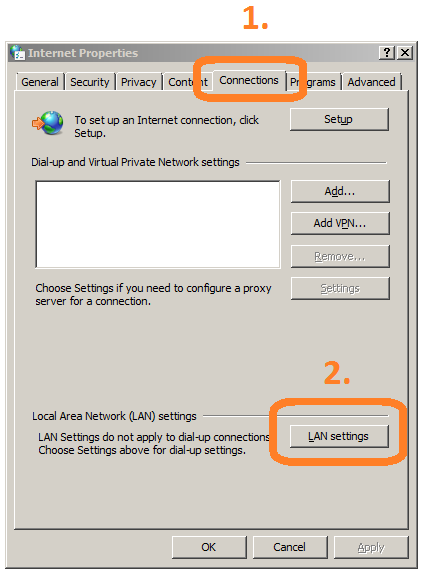
2) Select the "Connection" tab. Then click on the "LAN Settings" button.
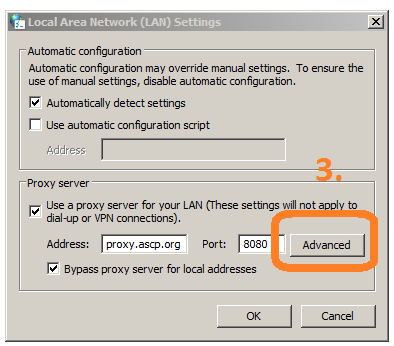
3) Then click on the "Advanced" button.
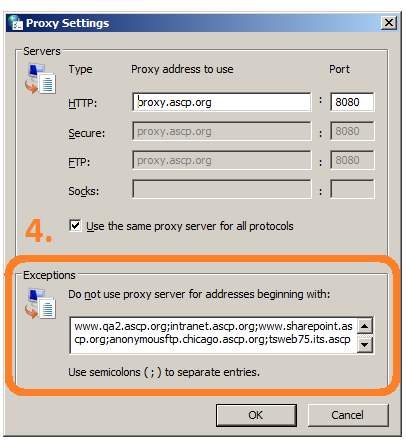
4) Finally, type in the web address into the end of the list. Remember to separate web addresses with a semicolon.
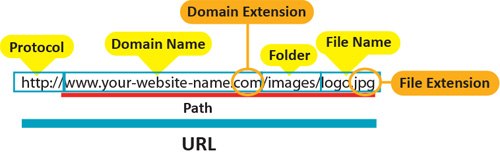
***Please keep in mind, you have to copy the everything between the "http://" and up to the domain extension, such as ".com" or ".org".
So for the below, it would be "www.your-website-name.com".
Sometimes there are multiple levels of sub-domains, such as "www.qa3.ascp.org".
5) Click OK on each of the three windows to save.