
ASCP Proxy - Helpful Tips
Differences When on/off the Proxy
***If you try to use both the WIFI and our internal network at the same time, you will run into network issues.
When on the proxy...
- All internet traffic will flow through our proxy, meaning all internet traffic will abide by our proxy security settings/policies/restrictions.
- You will have access to the internal Intranet website.
- You will have access to your email via Outlook.
- You will have access to internal network share drives.
-
You will have access to RDP to internal network servers and resources.
When off the proxy...
- All internet traffic will flow directly to your computer with no restrictions.
- All external websites will be accessible
- You will NOT have access to the internal Intranet website.
- You will NOT have access to your email via Outlook. You will need to use the webmail: https://mail.ascp.org
- You will NOT have access to internal network share drives.
-
You will NOT have access to RDP to internal network servers and resources.
Within the ASCP Network
To access the internet within the ASCP network, you must be using the proxy.
To enable the proxy:
1) Open Internet Options.
a. From the Internet Explorer browser, click on Tools --> Internet Options.
b. Or, click on the Start button --> open the Control Panel options --> click on Internet Options
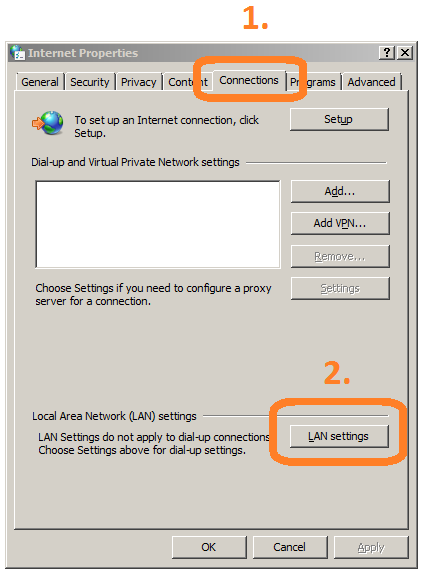
2) Select the "Connection" tab. Then click on the "LAN Settings" button.
3) Then check the box to "Use a proxy server for your LAN".
a. For the address box, type "proxy.ascp.org"
b. For the port box, type "8080"
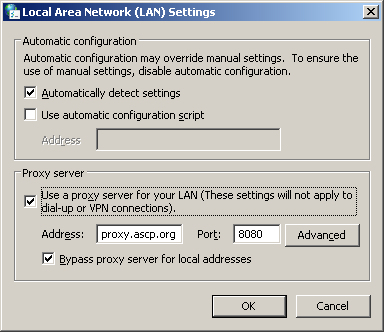
4) Click on the OK button to save.
***NOTE - If you receive a prompt to login, please use your normal network login.
Outside the ASCP Network
To access the internet outside the ASCP network or use the internal WIFI connection, you will need to disable the proxy.
To disable the proxy:
1) Open Internet Options.
a. From the Internet Explorer browser, click on Tools --> Internet Options.
b. Or, click on the Start button --> open the Control Panel options --> click on Internet Options
2) Select the "Connection" tab. Then click on the "LAN Settings" button.
3) Then un-check the box to "Use a proxy server for your LAN".
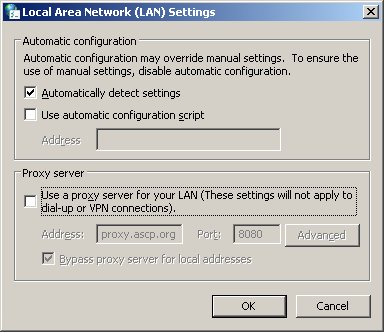
4) Click on the OK button to save.